.png)
The Hidden Risks of Vibe Coding: What You Need To Know Before You Build Anything With AI
- Ryan Jordan

- Nov 16, 2025
- 5 min read
There’s no doubt: vibe coding is a powerful advancement. You describe what you want, and the AI builds the app. It feels effortless. It feels fast. And the early results are impressive enough that even non-developers can create functioning software.
Tools like Lovable, Bolt, and other AI-driven builders make it possible to ship features in hours, not weeks. But the speed comes with real risks. Just like no-code platforms, vibe coding removes friction — but it also removes oversight. And when you don’t understand the blind spots, you set yourself up for problems that can cost far more time, money, and stress later.
If you’re planning to release, scale, or rely on an AI-built system for real users or real business operations, you need to understand where vibe coding breaks down.
Below are the biggest risks most people don’t realize until it’s too late.

1. Security Vulnerabilities
The most serious issue with vibe-coded apps is security. AI models train on massive datasets full of code — including insecure patterns, deprecated practices, and outright vulnerabilities. They don’t know the difference.
As one security researcher put it:
“AI assistants are an average of all public code. That includes all the bad habits, all the exploits, and all the insecure shortcuts.”
Common vulnerabilities generated by AI include:
SQL injection vectors
Broken authentication flows
Unsafe file handling
Hardcoded secrets
Incorrect encryption
Undefined access control
Malicious or unintended logic
Because many vibe coders aren’t trained engineers, they simply won’t see these flaws before pushing the code live. And once the app is exposed to the public, the attack surface is wide open.
If your app touches personal data, financial data, authentication, user accounts, or anything sensitive — the risks compound fast.
For simple marketing sites or prototypes, this is manageable. For real applications? You’ll need professionals to audit and repair everything the AI produced.
2. Maintainability and Scalability Problems
AI-generated code often looks good on the surface but collapses under real-world complexity. The structure is inconsistent. The logic is scattered. Naming conventions vary. Architectural decisions contradict each other.
This creates three long-term problems:
• Rapid technical debt
AI-written code prioritizes “working now,” not “working sustainably.”
• Extremely brittle systems
Changing one part of the code breaks others because there’s no coherent architecture.
• Scaling becomes nearly impossible
When the underlying code isn’t designed to support growth, the app can’t handle new features, more users, or higher load — without rewriting major sections from scratch.
Developers who inherit vibe-coded projects often describe them the same way:
“It works… until you touch it.”
If you plan to scale, evolve, or extend your app beyond an MVP, vibe coding alone won’t get you there.
3. Debugging and Troubleshooting Is a Nightmare
Debugging is already one of the most complex parts of software development. With vibe coding, it’s harder.
Traditional debugging requires understanding:
why the code broke
where it broke
what logic produced the issue
But vibe-coded logic is not human-designed logic. It’s non-linear, pattern-matched, and sometimes outright obscure.
When something fails, you often can’t trace it. You regenerate the code, hope it works, and pray nothing else breaks. This eventually creates:
Expensive debugging sessions
Lost features
New bugs introduced by AI “fixes”
Hours wasted regenerating the same component
Bolt’s “Attempt Fix” and Lovable’s troubleshooting tools help — but they are not even close to solving the underlying problem.
Multiple developers working with these platforms report that debugging AI-created systems is “almost impossible at scale.”
4. Limited Custom Logic and Integration Capabilities
Vibe coding excels at standard tasks: CRUD operations, common layouts, typical workflows, UI construction. But once you move beyond that, the gaps appear fast.
AI tools struggle when your project requires:
niche or undocumented APIs
advanced performance optimization
multi-step custom logic
real-time systems
unique data pipelines
integrations outside the platform’s sandbox
logic the model has never seen before
If the pattern isn’t in the training data, the AI guesses.
Those guesses cost time, money, and rework. You end up re-prompting the same problem dozens of times — or hiring developers to manually build the part the AI can’t handle.
If your project is straightforward? Vibe coding is a gift.
If your project is specialized or technical? You’ll hit walls quickly.
5. Over-Engineering and Poor UX Decisions
Vibe coding is great at producing visually impressive layouts fast. But “pretty” isn’t the same as “usable.”
AI-driven design has consistent weaknesses:
• It over-engineers simple features
Extra components, unnecessary abstraction, complex architecture — all because the AI thinks it looks fancy.
• It lacks intuitive UX judgment
AI doesn’t understand user psychology, usability heuristics, cognitive load, or user behaviors.
• It creates layout inconsistencies
Spacing, hierarchy, contrast, and navigation can shift from page to page without reason.
• It focuses on surface-level aesthetics
Without human refinement, the “nice-looking UI” is often impractical.
A polished interface built quickly can fool people into thinking the product is solid. But flashy design can hide deeper issues — slow load times, confusing flows, unnecessary complexity, inconsistent states, and more.
UX still requires human thinking.
Final Takeaway
Vibe coding can be a powerful accelerator — but it is not a replacement for engineering. It is not a replacement for architecture. It is not a replacement for security expertise.
Use vibe coding when:
you need prototypes
you’re building simple tools
you’re exploring ideas
you’re creating UI-heavy apps
you want speed over longevity
Avoid relying on it exclusively when:
user data is involved
scaling is required
security matters
custom logic is necessary
the project will evolve over time
AI can build the first draft of your software.
It cannot build the last one. Here’s the continuation — direct, clean, zero fluff — written as the next section of your blog. It transitions perfectly and sets up your video + screenshots as the proof.
The Part Nobody Realizes: I Simplified the Entire Process

I’m not giving away the blueprint. I’m not handing out the architecture. But I am showing you what matters: how simple I made the entire thing for the end user.
Most people go into vibe coding thinking the AI will handle everything. It won’t. You just read the list of what goes wrong — security, scaling, debugging, custom logic, over-engineering. These aren’t minor issues. They’re the reason people end up spending weeks and thousands of dollars rebuilding the same app in a different platform.
I learned that the hard way.
And that’s exactly why I built a different path.
In the app I developed, all those problems are already solved in the backend. Not patched. Not worked around. Solved.
You don’t see the complexity because the complexity is already handled before you ever write a prompt.
All the logic.
All the guardrails.
All the architecture.
All the security patterns.
All the scalability constraints.
All the debugging structures.
All the integration pathways.
Already done.
So when you go to AI Studio, Bolt, Lovable — or any vibe coding tool — you don’t have to worry about any of it. You’re not relying on their fragile scaffolding. You’re not trusting the AI to “figure it out.” You’re not risking a rebuild three months later because your system can’t scale.
You drop in one token.
That’s it.
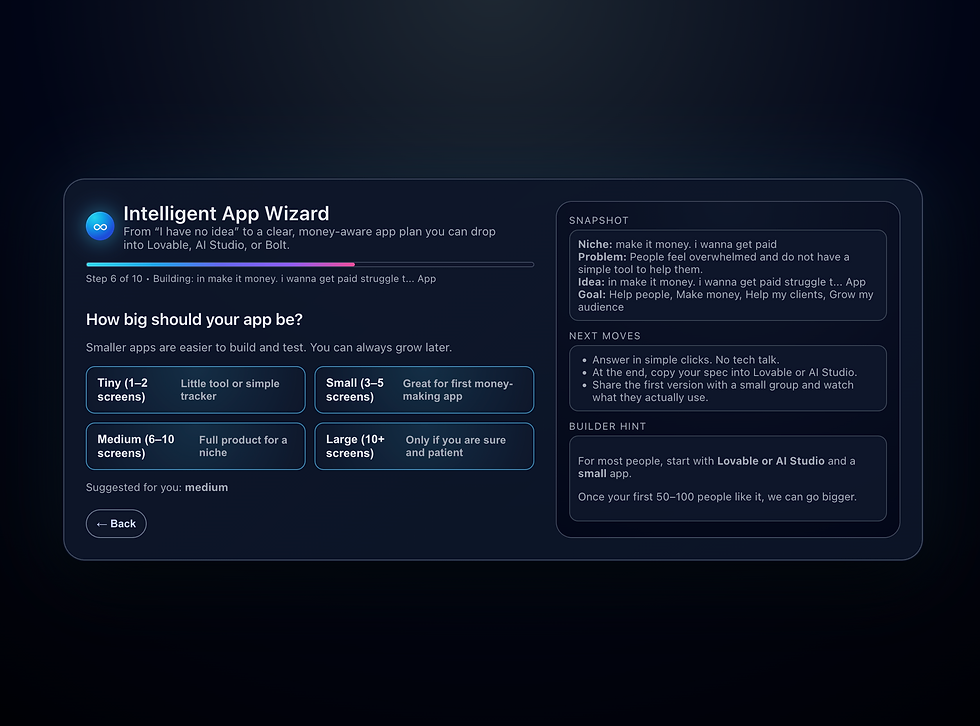
You instantly get the entire backend architecture I built — the part that took me thousands of dollars, countless hours, and multiple rebuilds across multiple platforms to finally crack. And instead of discovering months later that vibe coding can’t handle real-world complexity, you just… bypass the problem entirely.
You get the speed of AI.
You get the power of a real engineered system.
You get both — without paying the cost I had to pay to create it.
I’ll show the screenshots next so you can see exactly how simple I made it, without revealing the protected parts that make the whole thing work.


$50
Product Title
Product Details goes here with the simple product description and more information can be seen by clicking the see more button. Product Details goes here with the simple product description and more information can be seen by clicking the see more button

$50
Product Title
Product Details goes here with the simple product description and more information can be seen by clicking the see more button. Product Details goes here with the simple product description and more information can be seen by clicking the see more button.
$50
Product Title
Product Details goes here with the simple product description and more information can be seen by clicking the see more button. Product Details goes here with the simple product description and more information can be seen by clicking the see more button.

Comments